Browser Chrome — Placement Comparison

All four cards use the same card dimensions. The red dotted line marks where the screenshot image starts.

Current No chrome bar
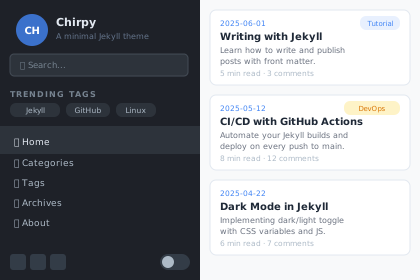
Free
Chirpy Free

Polished blog theme with dark mode, search and PWA support.

BlogDemo ↗

Image starts at top of card.
No separation from card body.

A Chrome outside — card gets taller
Free
Chirpy Free

Polished blog theme with dark mode, search and PWA support.

BlogDemo ↗

✅ Screenshot full size (75% ratio intact).
⚠️ Card is ~22px taller than current.

B Chrome inside — screenshot shrinks
Free
Chirpy Free

Polished blog theme with dark mode, search and PWA support.

BlogDemo ↗

⚠️ Screenshot is smaller (~22px stolen).
✅ Card height same as Option A.

A2 Dots only — no URL bar
Free
Chirpy Free

Polished blog theme with dark mode, search and PWA support.

BlogDemo ↗

✅ Minimal — just the dots.
✅ Screenshot full size.
⚠️ Card ~16px taller.

C Chrome in SVG — card unchanged
CH Chirpy 🔍 Search... TRENDING TAGS Jekyll GitHub 🏠 Home 📂 Categories 🏷 Tags 2025-06-01 Jekyll Dark Mode Guide Learn how to implement dark mode 5 min read · 3 comments 2025-05-14 CI/CD with GitHub Actions Automate your Jekyll builds 8 min read · 12 comments 2025-04-22 My Neovim Config 2025 Terminal setup for developers 6 min read · 7 comments
Free
Chirpy Free

Polished blog theme with dark mode, search and PWA support.

BlogDemo ↗

✅ Card height identical to current.
✅ Screenshot slightly smaller inside SVG only.

Card total height comparison:

Current — baseline

Option A — ~22px taller ↑

Option A2 — ~22px taller ↑

Option B — same height as A

Option C — identical to current ✓

Option Card height Screenshot size Code change Bottom fix?
Current Baseline 100%
A — Chrome + URL bar +22px taller 100% (unchanged) HTML only ✅ top edge
A2 — Dots only +22px taller 100% (unchanged) HTML only ✅ top edge
B — Chrome inside Same as A ~92% (shrinks) HTML only ✅ top edge
C — Chrome in SVG Identical ✓ ~91% inside SVG Update 13 SVGs ✅ top edge

Note: none of these options fix the bottom edge — combine any of A/B/C with a border-bottom on the image wrap to seal both edges.